Course overview.
Discover the essential tools and features of Microsoft Office 365 and learn how they can help you work more efficiently, stay organised, and communicate effectively. This session provides a practical introduction to some of the most widely used Microsoft applications, giving you the confidence to complete everyday tasks in a professional, academic, or personal setting.
During the session, you will explore how Microsoft Word can be used to create, edit, and format professional documents, while Microsoft Excel will introduce you to working with information, organising data, using basic formulas, and presenting information clearly. You will also learn how PowerPoint can help you create engaging presentations and communicate ideas effectively, as well as how Outlook can be used to manage emails, calendars, appointments, and day-to-day communication.
What you'll learn.
By the end of the session, you will have a better understanding of how the main Microsoft Office applications work together and how they can support your everyday activities. You will develop practical knowledge of creating and formatting documents, working with spreadsheets, preparing presentations, managing emails, and organising digital files.
You will also gain an understanding of how to use Office 365 more effectively, including saving and accessing files through the cloud, sharing documents, and working collaboratively with others. The session is designed to be practical and accessible, allowing you to build your confidence through familiar, real-world tasks rather than focusing only on theory.
Building your confidence.
Whether you are using Microsoft Office for work, study, job applications, administration, or personal projects, developing your digital skills can make everyday tasks quicker and easier. This session will help you become more comfortable navigating Microsoft Office applications and understanding which tools are best suited to different tasks.
Who it's for.
This course is perfect for individuals who are new to Microsoft Office 365 or have limited experience with its applications. It's suitable for students, professionals, job seekers, and anyone looking to improve their digital skills and become more confident using Microsoft Office.
It is also ideal for people who may already have some experience with Word, Excel, PowerPoint, or Outlook but would like to improve their knowledge and learn more efficient ways of completing everyday tasks. If you are eager to harness the power of cloud-based productivity, improve your digital confidence, and learn how to create, manage, organise, and share information effectively, this session provides an ideal starting point.
Microsoft 365 Office Beginner Course overview.
Get started with Microsoft 365 and learn how to make the most of the tools used every day in modern workplaces. This beginner-friendly course provides an introduction to the Microsoft 365 environment and its core applications, helping you understand how they work together to support communication, collaboration, organisation and productivity.
You'll explore the essential features and workflows across Microsoft 365, learning how to create and manage documents, communicate with colleagues, organise information and work with files more effectively. The course is designed around practical everyday tasks, giving you the confidence to use Microsoft 365 as part of your normal working routine.
Who it's for.
This course is designed for complete beginners who are new to Microsoft 365, as well as anyone who uses Microsoft applications but wants to develop a better understanding of the wider platform. It's suitable for students, employees, administrators, business owners and anyone looking to improve their digital workplace skills.
No advanced technical knowledge is required. The course starts with the fundamentals and gradually introduces the key tools and concepts, making it an ideal starting point for anyone who wants to become more confident and productive when working with Microsoft 365.
What you'll learn.
You'll learn how to navigate the Microsoft 365 environment and understand how its core applications and services can support your daily work. You'll explore essential productivity tools, file management, online collaboration, communication and the basics of working with documents and shared information.
You'll also learn practical techniques for organising your work, collaborating with others and making better use of Microsoft 365's cloud-based features. By the end of the course, you'll have a solid foundation in the Microsoft 365 environment and the confidence to use its tools more effectively in everyday work and study.
Microsoft Office 365 Intermediate Course overview.
Build on your existing Microsoft 365 knowledge and develop a more efficient, organised and collaborative approach to everyday digital work. This intermediate course takes you beyond the basics and explores the practical features of Microsoft 365 that can help you manage information, communicate with colleagues and work more effectively across documents, files and shared projects.
You'll work with key Microsoft 365 applications and services in greater depth, learning how to connect your everyday tasks and make better use of cloud-based collaboration. The course covers practical workflows such as managing files in OneDrive and SharePoint, collaborating on documents in real time, using Outlook more effectively, organising work in Teams and making better use of Microsoft 365's integrated productivity tools.
Who it's for.
This course is designed for learners who already have a basic understanding of Microsoft 365 and want to become more confident and productive with its wider range of tools. It's ideal for office professionals, administrators, managers, team leaders, students and business users who regularly work with Microsoft applications and shared digital information.
You should be comfortable with everyday computer use and have some experience with applications such as Word, Excel, Outlook or Teams. The course is particularly useful for anyone who wants to improve how they organise files, communicate with colleagues, collaborate on documents and manage their daily workload using Microsoft 365.
What you'll learn.
You'll develop practical skills with Outlook, including organising your inbox, using folders and categories, managing calendars, scheduling meetings and sharing availability. You'll also explore OneDrive for storing, organising and sharing files, including understanding file versions and accessing documents across different devices. In SharePoint, you'll learn how shared sites and document libraries can be used to organise information and support team collaboration.
You'll learn how to use Microsoft Teams more effectively, including creating and managing teams and channels, sharing files, working collaboratively and using meetings and chat to keep projects organised. You'll also explore real-time collaboration in applications such as Word, Excel and PowerPoint, learning how multiple people can work on the same files, add comments, track changes and maintain a single, up-to-date version of a document.
The course will also cover practical ways to connect these tools into a more efficient workflow. You'll learn how to manage files between OneDrive, SharePoint and Teams, organise shared information, use Microsoft 365 applications together and reduce duplication in everyday tasks. By the end, you'll be able to work more confidently across the Microsoft 365 environment, collaborate effectively with others and make better use of the platform's tools to manage your time, information and workload.
Microsoft Office 365 Advanced Course overview.
Take your Microsoft 365 skills to an advanced level and learn how to use the platform more strategically to manage information, collaborate across teams and improve productivity. This course builds on your existing Microsoft 365 experience and explores advanced features, workflows and best practices for working effectively in a modern digital workplace.
You'll go beyond using individual applications and learn how Microsoft 365 tools can work together as part of a connected workflow. The course covers advanced collaboration, file and information management, productivity techniques and practical ways to streamline everyday processes across Outlook, Teams, SharePoint, OneDrive, Word, Excel and PowerPoint.
Who it's for.
This course is aimed at experienced Microsoft 365 users who already use the platform regularly and want to become more efficient and capable. It's ideal for professionals, team leaders, managers, administrators, project teams and power users who are responsible for managing information, collaborating with others or improving digital workflows within their organisation.
You should already be comfortable using the core Microsoft 365 applications, including Outlook, Teams, Word, Excel, OneDrive and SharePoint. The course focuses on advanced usage and practical workflows rather than introducing the individual applications from the beginning.
What you'll learn.
You'll learn advanced techniques for managing Outlook, including organising complex inboxes, using rules and categories, managing calendars and creating more efficient meeting workflows. You'll develop advanced Teams skills, including managing teams and channels, controlling shared content, organising meetings and improving collaboration across projects and departments.
You'll work in greater depth with SharePoint and OneDrive, learning how to structure document libraries, manage permissions and sharing, control file versions and organise information so that teams can access the right content efficiently. You'll also explore advanced collaboration in Word, Excel and PowerPoint, including shared documents, comments, version control and techniques for maintaining consistent, collaborative workflows.
The course will also explore how to connect Microsoft 365 applications into more efficient working processes. You'll learn practical approaches to organising information, reducing duplication, improving team communication and making better use of cloud-based collaboration. By the end, you'll be able to design more effective Microsoft 365 workflows, work confidently with shared information and use the platform's advanced capabilities to improve productivity across your day-to-day work.
This course is fully fundable through ReACT+.
If you've been made redundant or are facing redundancy in Wales, the Welsh Government's ReACT+ scheme can fund up to £1,500 toward this course — plus childcare, travel and accommodation expenses. We'll handle the application.
Benefits of Attending This Course
Gain comprehensive Microsoft Office 365 skills to improve productivity, collaboration and digital efficiency. Learn how to use the Microsoft 365 suite confidently, streamline everyday tasks and work more effectively in today's connected workplace.
Ascent Training Wales · Bridgend.
Our conference room is purpose-built for effective training — bright, modern, and fully equipped for workshops, seminars and accredited sessions.
Llynfi Enterprise CentreHeol Ty Gwyn Industrial Estate
Maesteg, Bridgend, CF34 0BQ

Master Microsoft Office 365 for the Modern Workplace
Build Essential Office 365 Skills
Learn how to use Microsoft 365 applications effectively, including Word, Excel, PowerPoint, Outlook and Teams to boost productivity.
Collaborate More Efficiently
Discover how to share files, communicate seamlessly and collaborate in real time using Microsoft 365 cloud-based tools.
Work Smarter Every Day
Develop practical techniques to organise work, automate routine tasks and maximise efficiency across your daily workflow.
Common questions.
Quick answers to what most people ask before booking. Still need help? Get in touch.
How long is the course and where is it delivered?
How much does it cost and what's included?
When is the next date available?
Is this course eligible for ReACT+ funding?
Can you deliver this course in-house for our team?
From the classroom.
Our Bridgend venue is purpose-built for working learning — bright, modern, configurable for cohorts of four to twelve, with quality AV throughout and free parking right outside.


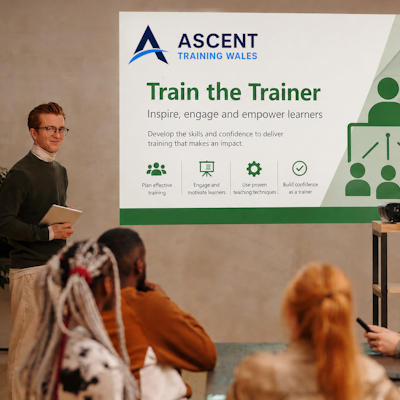

Llynfi Enterprise Centre · Bridgend · More about our venue →
More in Computing.
Courses that pair well with Microsoft Office 365, or that your team often takes as a sequence.

Ready when you are.
Book Microsoft Office 365 for £195 a seat, or send us a brief and we'll come back with a tailored in-house quote for your team within two working days.