Course overview.
Our Microsoft Word Beginner to Advanced courses are designed to help you develop your document creation and editing skills at every stage, from learning the fundamentals to mastering more advanced features and techniques. You will learn how to create, edit, format, and manage professional documents, using a range of tools including text and paragraph formatting, page layouts, tables, images, styles, headers and footers, templates, references, and collaboration features.
Through practical exercises and hands-on activities, you will build the knowledge and confidence to use Microsoft Word effectively, helping you create polished, professional, and well-structured documents for work, study, or personal use.
Who it's for.
These courses are suitable for individuals at a range of skill levels, from those who are new to Microsoft Word to more experienced users looking to develop and expand their knowledge. They are ideal for students, professionals, administrators, job seekers, and anyone who regularly creates or works with documents. Whether you are learning the fundamentals or exploring more advanced features, our Microsoft Word courses provide practical skills to help you work more efficiently and confidently.
Microsoft Word Beginner Course overview.
Learn the fundamentals of Microsoft Word and build the skills needed to create clear, professional documents with confidence. This beginner-friendly course introduces you to Word's interface, essential tools and everyday features, giving you a practical foundation for creating, editing and formatting documents for work, study or personal use.
You'll work through Word step by step, learning how to create new documents, enter and format text, organise information and present content effectively. The course focuses on practical tasks and good working habits, helping you understand the tools you use most often and giving you the confidence to produce well-structured documents from scratch.
Who it's for.
This course is designed for complete beginners who are new to Microsoft Word, as well as anyone who has used Word before but wants to develop a stronger understanding of its features. It's ideal for students, office workers, administrators, business users and anyone who needs to create professional documents as part of their everyday work or studies.
No previous Word experience is required. Whether you need to create letters, reports, meeting documents, applications or general business paperwork, the course provides a clear and practical starting point for developing your confidence with Microsoft Word.
What you'll learn.
You'll learn how to navigate the Word interface, create and save documents, enter and edit text, and apply professional formatting. You'll work with fonts, paragraphs, alignment, spacing, bullets and numbering, as well as learning how to use styles to create consistent and well-structured documents.
You'll also learn how to insert and format tables, images, shapes and other content, while exploring page layout, margins, headers, footers and page numbers. By the end of the course, you'll be able to create, format and prepare professional-looking Word documents and have a strong foundation for progressing to more advanced document creation techniques.
Microsoft Word Intermediate Course overview.
Build on your existing Microsoft Word skills and learn how to create more polished, structured and professional documents. This intermediate course takes you beyond the fundamentals and introduces more advanced formatting, document management and productivity techniques that can help you work faster and produce consistently high-quality results.
You'll learn how to use Word's more powerful features to manage longer and more complex documents, maintain consistent formatting and present information clearly. The course focuses on practical workplace tasks, helping you develop efficient workflows for reports, proposals, business documents and other professional content.
Who it's for.
This course is designed for learners who already have a basic understanding of Microsoft Word and want to develop more advanced document creation skills. It's ideal for office professionals, administrators, managers, students, business users and anyone who regularly produces documents and wants to improve their efficiency and presentation.
You should already be comfortable with basic text editing, formatting and document creation. The course builds on those skills and introduces more advanced features, making it suitable for anyone who wants to move from everyday Word use towards a more professional and structured workflow.
What you'll learn.
You'll learn how to use styles and formatting tools to create consistent documents, including custom headings, paragraph styles and structured layouts. You'll also explore section breaks, headers and footers, page numbering and document navigation to manage longer documents more effectively.
You'll work with more advanced tables, images, shapes and other document elements, learning how to position and format content accurately. You'll also explore templates, themes, columns, captions and cross-references to create professional reports and business documents with a consistent visual structure.
The course will also introduce practical productivity features such as find and replace, document inspection, comments, track changes and collaboration tools. By the end, you'll be able to create and manage longer, more sophisticated Word documents efficiently and produce professional results with greater confidence.
Microsoft Word Advanced Course overview.
Take your Microsoft Word skills to an advanced level and learn how to create, manage and refine complex professional documents with greater efficiency. This course builds on your existing Word knowledge and explores advanced formatting, document structure, automation and collaboration features that can help you produce sophisticated documents to a professional standard.
You'll develop a more structured approach to working with long and complex documents, learning how to maintain consistency, manage large amounts of content and streamline repetitive tasks. The course focuses on practical techniques that can be applied to reports, proposals, technical documents, business templates and other professional publications.
Who it's for.
This course is aimed at experienced Microsoft Word users who already have strong knowledge of the software and want to develop advanced document production skills. It's ideal for administrators, business professionals, managers, technical authors, project teams and anyone responsible for producing detailed or highly structured documents.
You should already be confident with Word's standard formatting, styles, tables and page layout features. The course assumes this existing knowledge and focuses on advanced document management, automation, consistency and professional publishing techniques.
What you'll learn.
You'll learn how to manage complex documents using advanced styles, templates and document structures, creating consistent formatting across large amounts of content. You'll work with section breaks, headers and footers, automatic page numbering, tables of contents, indexes and cross-references to create professional long-form documents that are easy to navigate and maintain.
You'll also explore advanced features such as mail merge, fields, captions, linked content and document automation, helping you reduce repetitive work and improve consistency. You'll learn how to manage revisions using Track Changes and comments, compare document versions and collaborate effectively when multiple people are contributing to the same document.
The course will also cover professional document preparation, including templates, themes, advanced tables, content controls and techniques for preparing documents for printing or digital distribution. By the end, you'll be able to confidently manage complex Word projects, build reusable document templates and produce polished, professional documents efficiently.
This course is fully fundable through ReACT+.
If you've been made redundant or are facing redundancy in Wales, the Welsh Government's ReACT+ scheme can fund up to £1,500 toward this course — plus childcare, travel and accommodation expenses. We'll handle the application.
Benefits of Attending This Course
Develop the Microsoft Word skills needed to create professional documents, work more efficiently, and collaborate with confidence. Learn practical techniques for formatting, editing, and organising content to improve productivity in the workplace, at school, or at home.
Ascent Training Wales · Bridgend.
Our conference room is purpose-built for effective training — bright, modern, and fully equipped for workshops, seminars and accredited sessions.
Llynfi Enterprise CentreHeol Ty Gwyn Industrial Estate
Maesteg, Bridgend, CF34 0BQ

Master Microsoft Word for Better Productivity
Create Professional Documents
Learn how to create, format, and structure polished documents using Word's powerful editing and design tools.
Work More Efficiently
Save time with templates, styles, headers and footers, tables, and other productivity features that streamline document creation.
Collaborate with Confidence
Use comments, Track Changes, and sharing tools to review, edit, and collaborate effectively with colleagues, clients, or classmates.
Common questions.
Quick answers to what most people ask before booking. Still need help? Get in touch.
How long is the course and where is it delivered?
How much does it cost and what's included?
When is the next date available?
Is this course eligible for ReACT+ funding?
Can you deliver this course in-house for our team?
From the classroom.
Our Bridgend venue is purpose-built for working learning — bright, modern, configurable for cohorts of four to twelve, with quality AV throughout and free parking right outside.

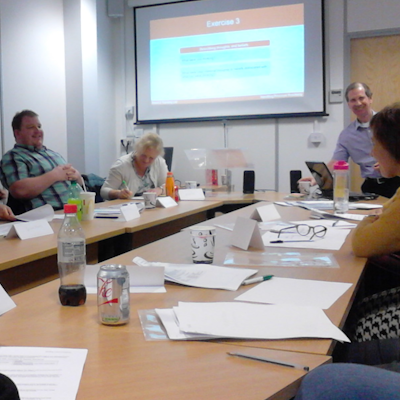
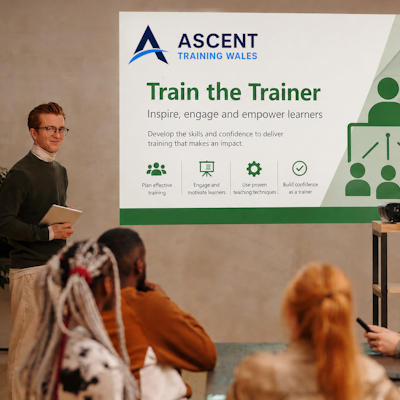

Llynfi Enterprise Centre · Bridgend · More about our venue →
More in Computing.
Courses that pair well with Microsoft Word 365, or that your team often takes as a sequence.

Ready when you are.
Book Microsoft Word 365 for £195 a seat, or send us a brief and we'll come back with a tailored in-house quote for your team within two working days.